
See how your AI agents really work
FlowCruncher turns agent logs and OpenTelemetry traces into a health score, the real process flow and a map of which agents hand work to which, so you know what to fix first.
Process mining for AI agents
FlowCruncher reads the logs and traces your agents already produce (CSV agent logs, Codex and OpenCode sessions, and OpenTelemetry traces) and turns them into a health score, a ranked list of issues, a map of how the work really flows, and a picture of which agents hand work to which. It works on a log you upload after the fact, and live while agents are running.
Teams building AI agents
Who need to see why a run was slow, expensive or wrong.
Platform and operations teams
Running many agents, who need a live view of errors and throughput.
Process and automation leads
Who want facts, not opinions, about where an agent-driven process loses time.
Where did the time go?
Know what went wrong, and what to fix first
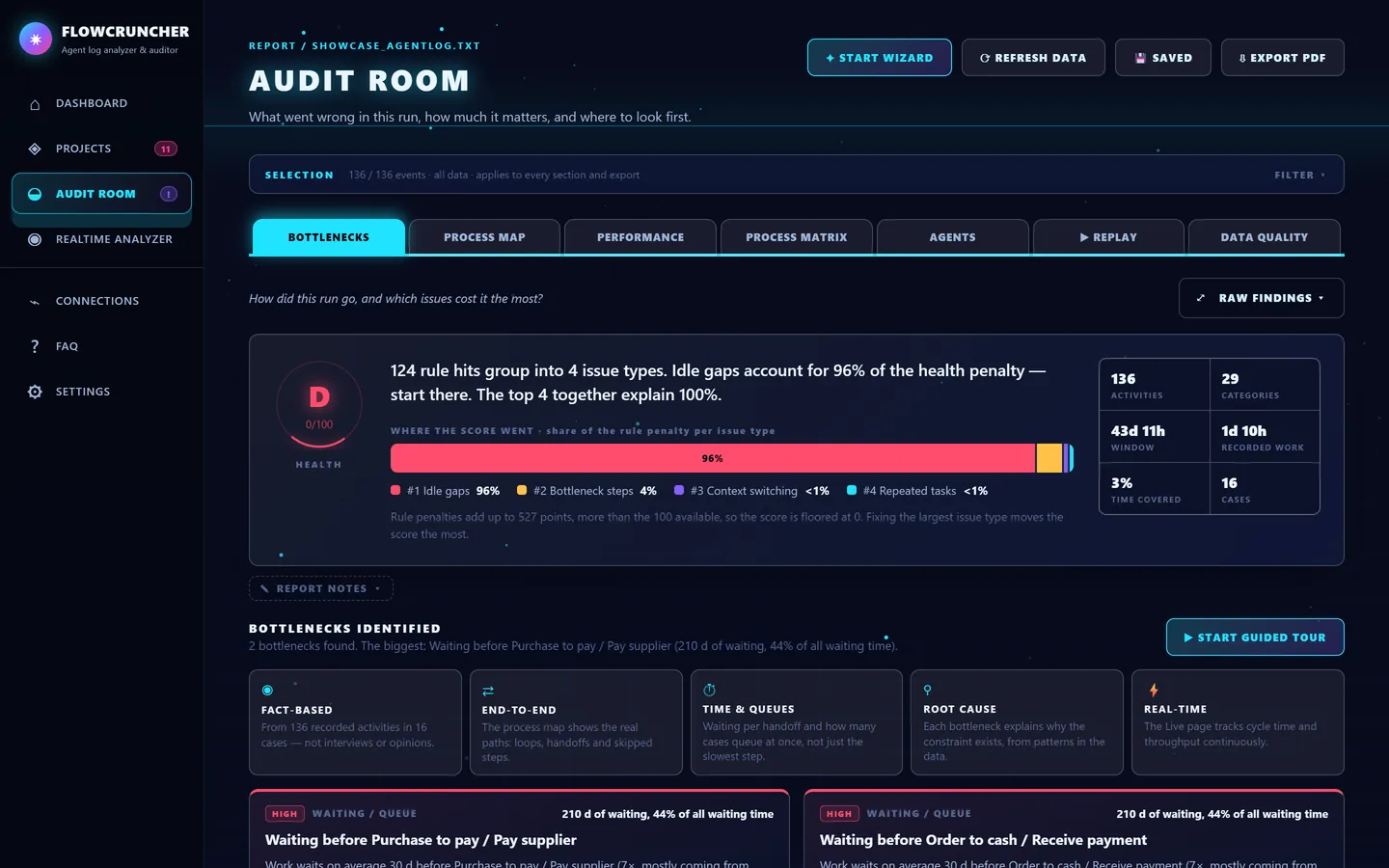
Every audit gets a health score and a plain-language verdict. FlowCruncher groups rule hits into issue types, shows how much of the penalty each one causes and names the bottlenecks it found, such as 30 days of waiting before suppliers get paid.
Where the time goes
Separate active work from idle time per step. In the showcase, the agents are busy only 3% of the time; the rest is waiting.
How does the work really flow?
See how the work really flows
FlowCruncher discovers the process from the log itself. Every step is a node, every hand-off is an edge, and rework loops stand out in pink.
Every hand-off, counted
The process matrix shows which step follows which, and how often, so rare paths and exceptions are easy to spot.
Replay the busiest moment
Step through the log as it happened, activity by activity, with a running clock, throughput and alerts.
Who talks to whom?
Follow one case from agent to agent
The sequence view lays out a single case with one lane per agent. Arrows show each hand-off and how long it took before the work came back.
Who works with whom
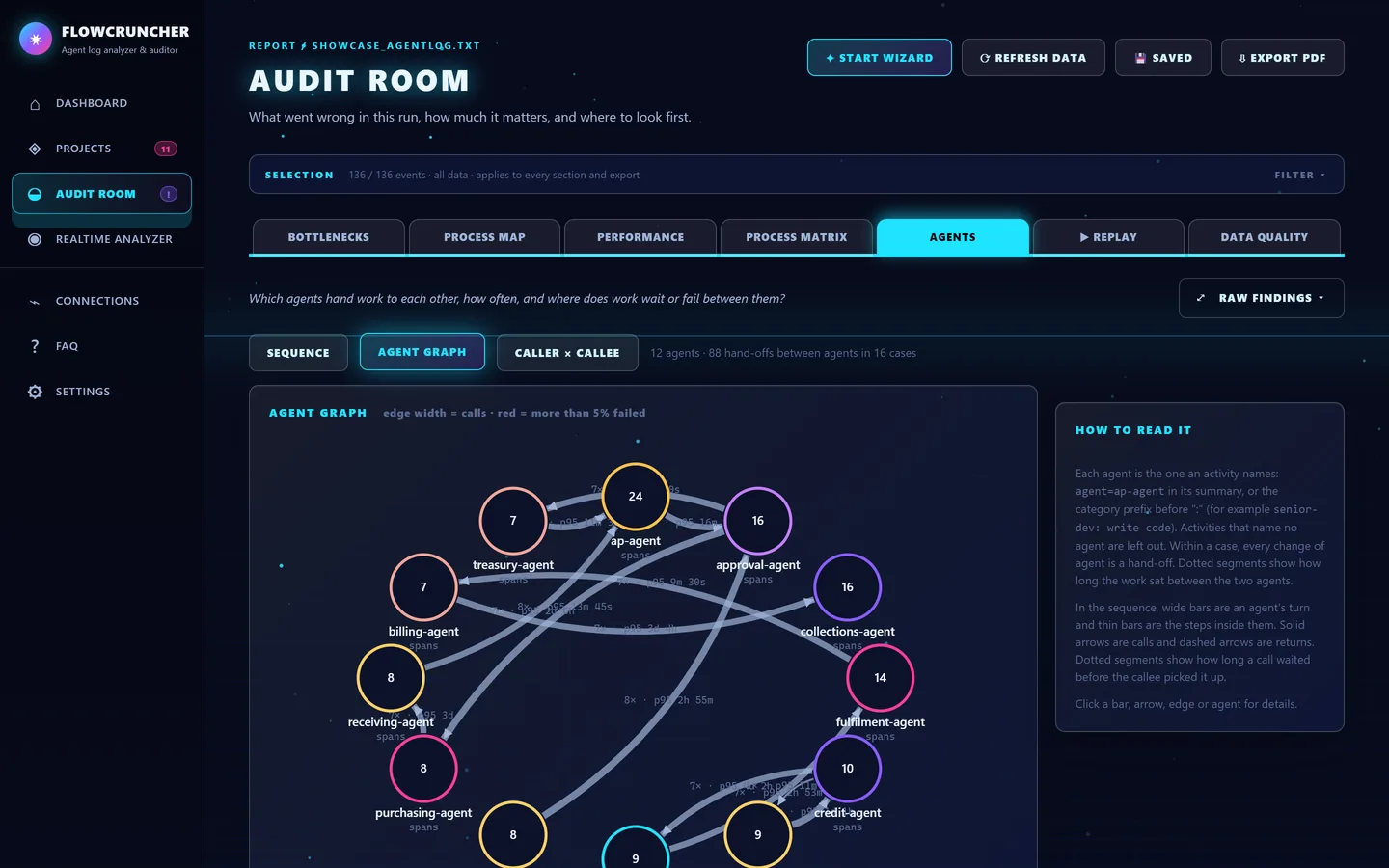
The agent graph combines every case: thicker lines mean more hand-offs, and red lines mean frequent failures. Click any agent or connection for the numbers.
Agent-to-agent calls, straight from your traces
FlowCruncher reads the OpenTelemetry GenAI conventions and follows calls between agents, also across services. Each run becomes a sequence of who called whom and how long it took.
Watch agents live
Watch your agents live
Send OpenTelemetry traces to FlowCruncher and see health, spans per minute, error rate and active runs update as the agents work. Alerts fire on failed steps and error bursts.
The process, discovered while it runs
The live process map updates with every trace, at agent level or step level.
Can I trust the data?
Know you can trust the log
Twelve checks look for missing values, time anomalies, overlaps, near-duplicate labels and incomplete cases before you draw conclusions.
Up and running in minutes
Four guided steps
Pick a project, point at your logs, choose one and audit it.
Bring logs from anywhere
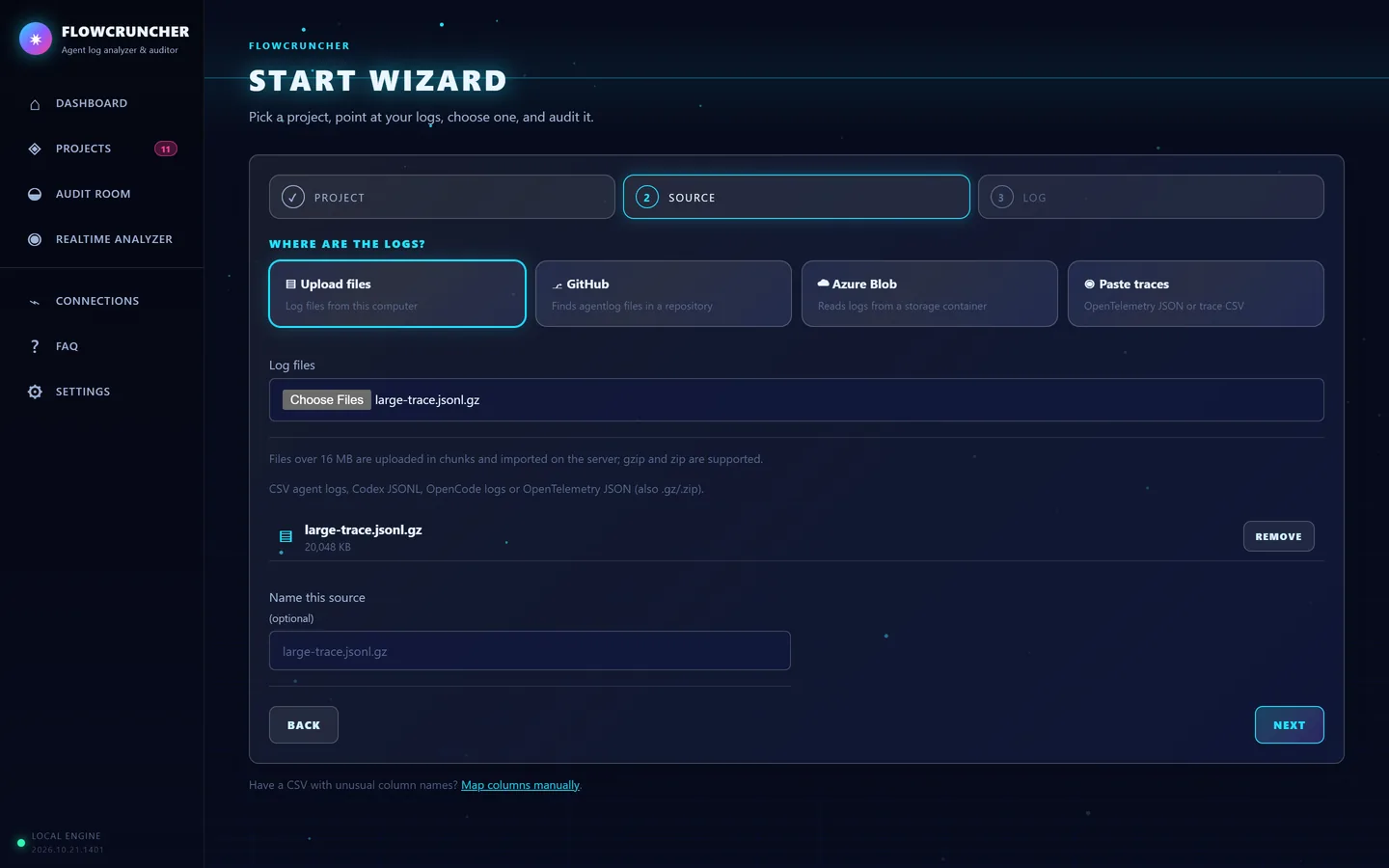
Upload files, read them from GitHub or Azure Blob storage, or paste traces. CSV agent logs, Codex and OpenCode sessions and OpenTelemetry JSON are supported, also gzip or zip.
Your agents at a glance
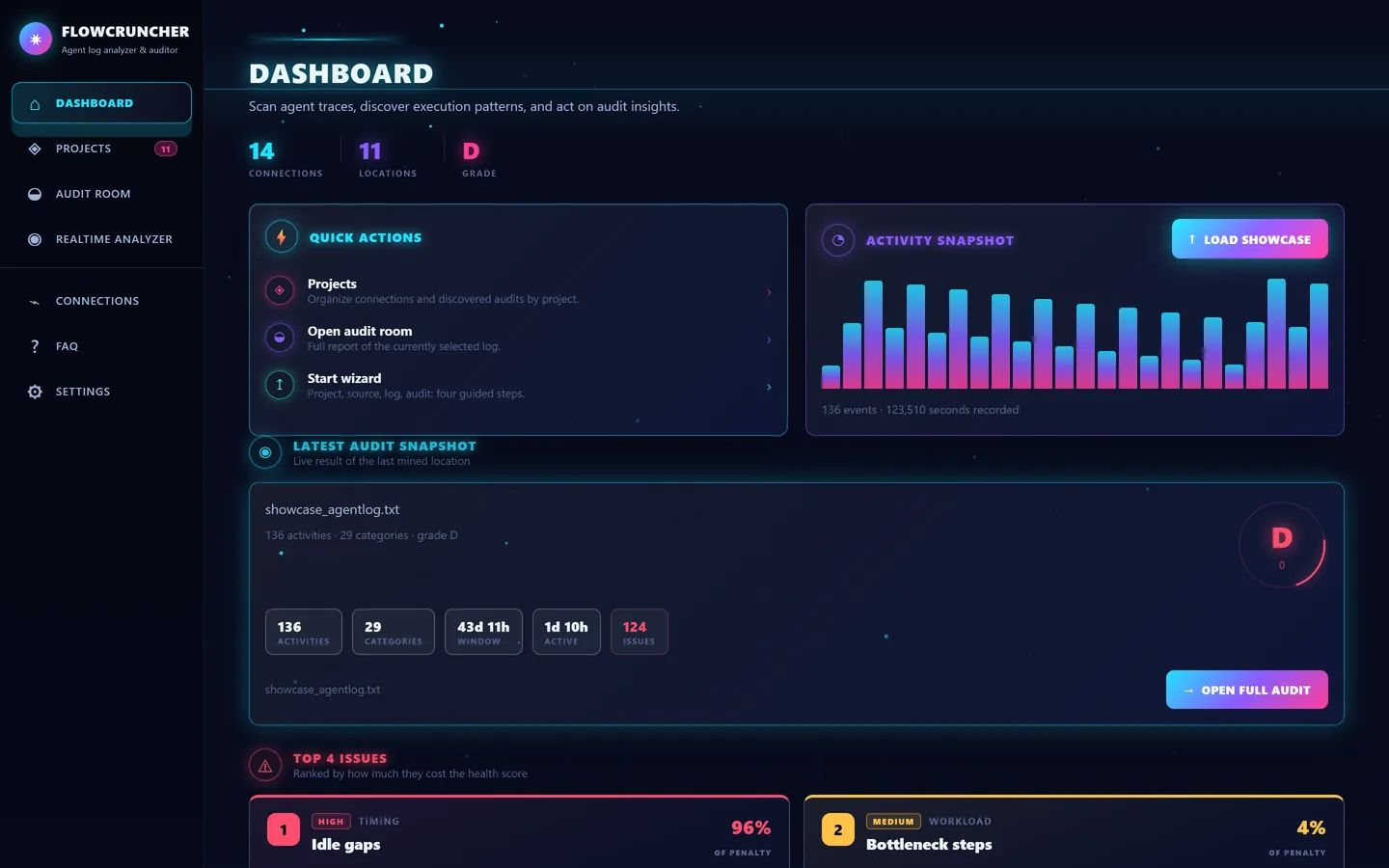
The dashboard shows the latest audit's grade, its activity, and the issues that cost the most, ranked by impact.
Built for big traces
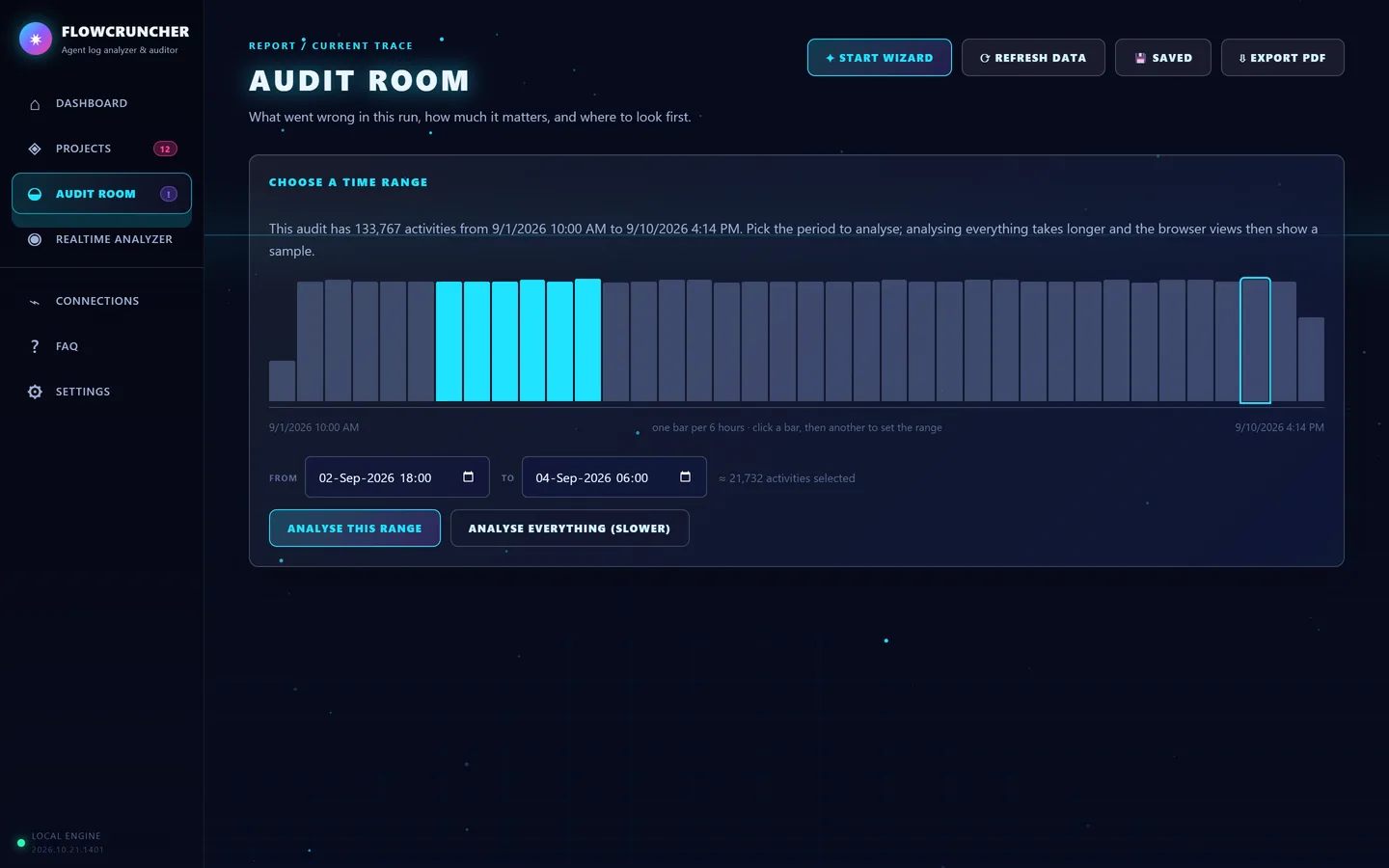
Open a trace with hundreds of thousands of activities and choose the period you care about first. FlowCruncher suggests the busiest window and analyses it in seconds.
From agent activity to measurable improvement
FlowCruncher collects what your agents do, analyses it, shows it, and helps you refine skills and prompts. Then you measure again.


What teams use it for
Find the bottleneck in an agent workflow
See where work waits, which step is slowest and which hand-off piles up, with the root cause and suggested actions.
Understand multi-agent systems
See which agents call which, how often, how long each call takes and where calls fail and get retried.
Monitor agents live
Point your OpenTelemetry exporter at FlowCruncher and watch health, error rate, throughput and alerts while the agents run.
Audit a business process run by agents
The built-in showcase runs purchase-to-pay and order-to-cash with 12 agents and shows the long waits before payments.
Analyse very large trace files
Upload compressed trace files with hundreds of thousands of spans and pick the time range to analyse.
Everything in one place
- Health score and ranked issues
- Data-driven bottlenecks with root cause and actions
- Process map, process matrix and variants
- Agent sequence, agent graph and caller × callee matrix
- Realtime analyzer for OpenTelemetry (OTLP/HTTP)
- Replay of the busiest moment
- Twelve data quality checks
- Notes, tasks and PDF export
- Large, compressed trace files with time-range selection
- Optional sign-in and Azure deployment
Find the bottleneck in your agents today
Load the built-in showcase in one click, or point your OpenTelemetry exporter at FlowCruncher and watch your agents live.
Want us to do the analysis? See our consultancy services.
Screenshots and videos show demo data from the built-in purchase-to-pay and order-to-cash showcase, the bundled agent simulator and a generated test trace.
Talk to FlowCruncher
Questions about the product, a demo, or help with an analysis? Please contact us.
Address
FlowCruncher
Batouwse singel 121
4033 KS, The Netherlands
Services
Product licenses and subscriptions, consultancy, analysis and workshops.